
Networking Learning Journal — Day 3: Which Neighborhood Owns This IP?
My third-day notes on IPv4, binary, subnet masks, and CIDR by calculating network addresses, broadcasts, and usable host ranges.
Table of contents · 14 sections
Yesterday I examined how packets travel across layers. Today I am zooming in on the packet’s navigation screen.
I keep encountering addresses like these:
192.168.1.25/24
10.0.0.5/8
172.16.5.100/27
I am becoming familiar with the IP part. But what do /24 and /27 mean? Why can two devices with similar-looking addresses sometimes communicate directly, while at other times they need a router? Where does an address’s “neighborhood” begin and end?
That is today’s exact objective:
Given an IPv4 address, calculate its network address, broadcast address, and usable host range myself.
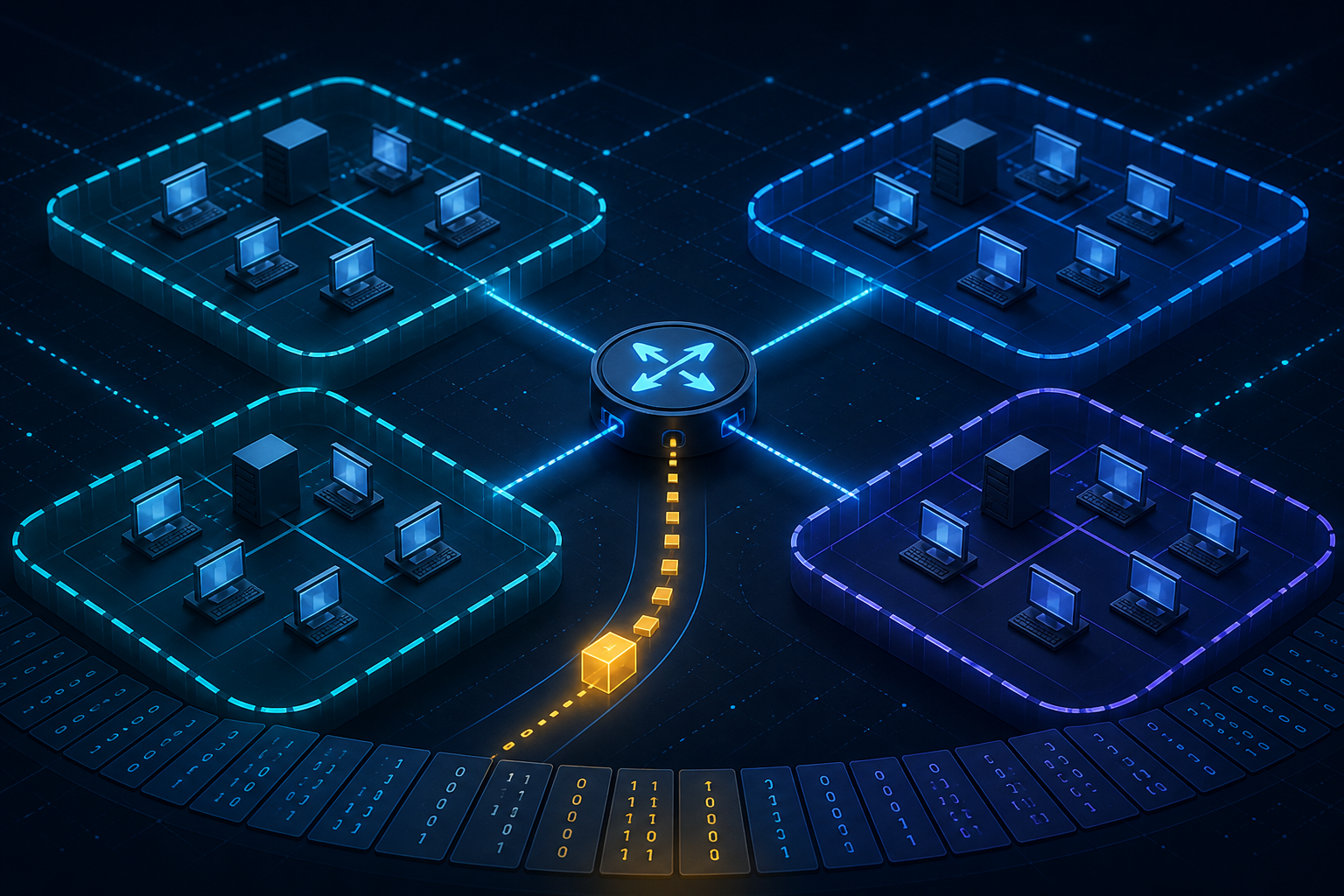
Why does IPv4 have four parts?
An IPv4 address contains 32 bits. To make it easier to read, those bits are divided into four groups of eight. Each group is an octet.
192  .  168  .  1  .  25
octet  octet  octet  octet
An octet has eight bits, each either 0 or 1. Its minimum value is 00000000, or 0; its maximum is 11111111, or 255. Every IPv4 octet must therefore be between 0 and 255.
The bit place values are:
128 64 32 16 8 4 2 1For example, 192 is 11000000 in binary:
128 + 64 = 192And 168 is 10101000:
128 + 32 + 8 = 168The complete address can therefore be written as:
192.168.1.25
11000000.10101000.00000001.00011001
At first it looks like a low-budget sequel to The Matrix. Fortunately, I do not need to convert every address completely into binary. I do need to meet this representation once to understand why subnet masks work.
The neighborhood and door number inside an IP address
An IPv4 address is logically divided into two parts:
Network portion | Host portionIn 192.168.1.25/24, /24 says that the first 24 bits identify the network and the remaining 8 identify the host inside that network.
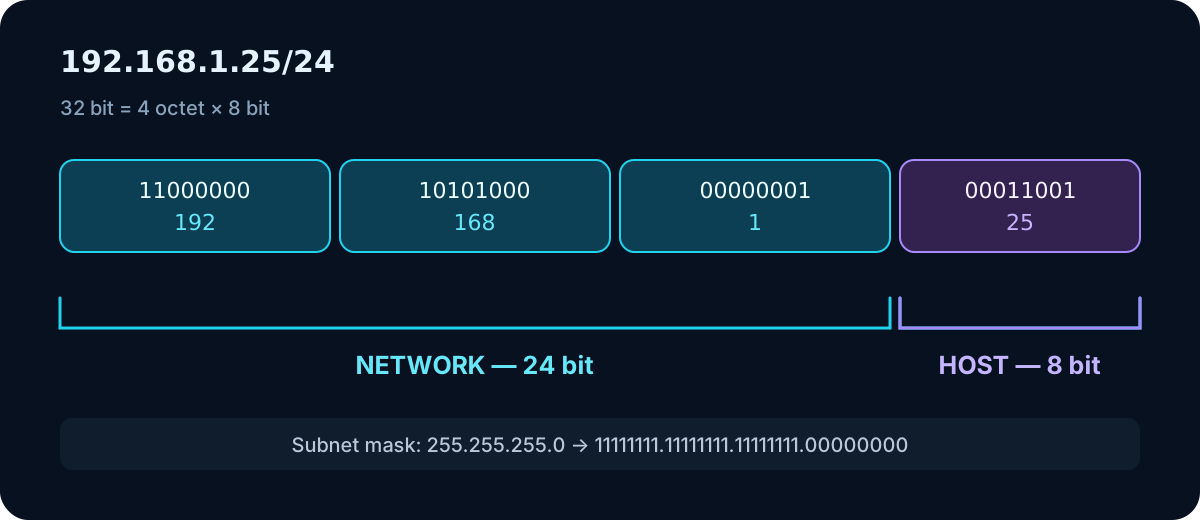
I can picture it as a neighborhood and door number:
192.168.1 | 25
neighborhood  door
The analogy establishes the idea but not the complete technical reality. A network boundary does not always stop at the end of an octet. With /25, /26, or /27, the boundary enters the middle of the final octet. This is where subnetting becomes fun—or produces a mild headache during the first half hour.
Subnet masks and CIDR describe the same boundary
A subnet mask indicates which IP bits belong to the network and which belong to the host. A 1 bit represents the network portion; a 0 represents the host portion.
255.255.255.0
11111111.11111111.11111111.00000000
There are 24 ones, so the short form is /24.
CIDR stands for Classless Inter-Domain Routing. In daily use, slash notation provides a shorter form of the subnet mask:
| CIDR | Subnet mask | Total addresses | Traditional usable hosts |
|---|---|---|---|
| /24 | 255.255.255.0 | 256 | 254 |
| /25 | 255.255.255.128 | 128 | 126 |
| /26 | 255.255.255.192 | 64 | 62 |
| /27 | 255.255.255.224 | 32 | 30 |
| /28 | 255.255.255.240 | 16 | 14 |
| /29 | 255.255.255.248 | 8 | 6 |
| /30 | 255.255.255.252 | 4 | 2 |
The basic formulas are:
Host bits = 32 - CIDR
Total addresses = 2^(host bits)
Traditional usable hosts = 2^(host bits) - 2
Why subtract two? In a traditional subnet, the first address is reserved as the network address and the last as the broadcast address. Special cases such as /31 and /32 fall outside this classic calculation; today I am focusing on standard host subnets.
Network, broadcast, and usable hosts
Consider 192.168.1.0/24:
Network:    192.168.1.0
First host: 192.168.1.1
Last host:  192.168.1.254
Broadcast:  192.168.1.255
The network address represents the subnet itself. It is not a normal host address assigned to a device; it is the sign at the neighborhood entrance.
The broadcast address targets every host in the subnet. It is networking’s “everyone on this street should hear this” announcement.
The addresses between them form the traditional assignable host range.
The critical point is:
An IP address alone does not reveal the network boundary without a subnet mask.
The same IP belongs to very different networks under two masks:
192.168.1.25/24 → 192.168.1.0/24
192.168.1.25/16 → 192.168.0.0/16
It is like knowing the building number without the district. An address exists, but context is missing.
Are we on the same subnet?
Two devices are on the same subnet when applying their subnet masks produces the same network address.
Host A: 192.168.1.20/24 → Network: 192.168.1.0
Host B: 192.168.1.50/24 → Network: 192.168.1.0
They share a local network and, with suitable Layer 2 connectivity, can communicate locally.
If Host B were 192.168.2.50/24, the network addresses would differ and a router would be needed.
Same subnet      → local delivery
Different subnet → delivery through a router
The default gateway from day one now makes more sense: my computer uses the mask to decide that the destination is outside its subnet and hands the packet to the exit.
Block size: A subnet-calculation shortcut
/24 is easy because the final octet is entirely for hosts. What about /25, /26, and /27?
A practical method is:
Block size = 256 - changing octet in the maskThe /26 mask is 255.255.255.192:
256 - 192 = 64Subnets begin every 64 values in the final octet:
0, 64, 128, 192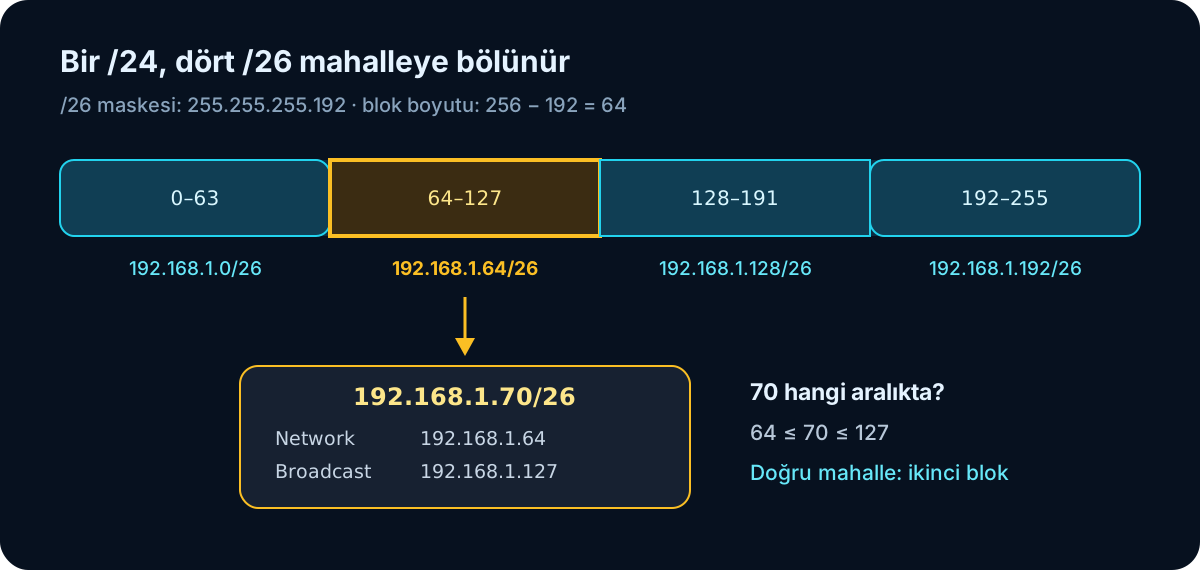
For 192.168.1.70/26, 70 falls inside 64–127:
Network:    192.168.1.64
First host: 192.168.1.65
Last host:  192.168.1.126
Broadcast:  192.168.1.127
That is the core calculation: find the two block boundaries surrounding the IP. The first is the network; the address immediately before the next is the broadcast.
A /27 example
For 172.16.5.100/27, the final mask octet is 224:
Block size: 256 - 224 = 32
Starts: 0, 32, 64, 96, 128, 160, 192, 224
100 falls in 96–127:
Network:    172.16.5.96
First host: 172.16.5.97
Last host:  172.16.5.126
Broadcast:  172.16.5.127
What is actually happening in binary?
The shortcut is useful but not magic. The network address is technically found using a bitwise AND between the IP and subnet mask.
IP:    11000000.10101000.00000001.00011001
Mask:  11111111.11111111.11111111.00000000
AND:   11000000.10101000.00000001.00000000
The result is 192.168.1.0. With AND, a result bit is 1 only when both input bits are 1. Block size is fast for daily calculations; binary explains why the result is correct.
Private, public, and other special addresses
Not every IPv4 address can travel directly across the public internet. These ranges are reserved for private networks:
10.0.0.0/8
172.16.0.0/12
192.168.0.0/16
A common mistake is assuming every address beginning with 172 is private. Only 172.16.0.0–172.31.255.255 is private.
At home, my laptop may be 192.168.1.20 and my phone 192.168.1.21. Through NAT, the router can send both devices’ traffic to the internet using a public IP. I will leave NAT for a later day; for now, it is enough to know that many private addresses can sit behind one public exit.
Other special ranges I may encounter:
| Address | What should it suggest? |
|---|---|
127.0.0.0/8 |
Loopback; the device itself |
169.254.0.0/16 |
Link-local; often failure to obtain an address from DHCP |
0.0.0.0 |
Depending on context, unspecified address, all interfaces, or default route |
255.255.255.255 |
Limited broadcast |
When I see 169.254.x.x, my first reaction should not be “the internet is broken,” but “why did DHCP fail to provide an address?”
Why must the default gateway be on the same subnet?
A normal configuration:
Host:    192.168.1.20/24
Gateway: 192.168.1.1
A problematic example:
Host:    192.168.1.20/24
Gateway: 192.168.2.1
Before the host can hand a packet to its gateway, it must reach that gateway locally. In the second example, the gateway is on another subnet: the door required to reach another network is itself on another network. It is like locking the key inside while the locksmith is also inside.
Why subnet a network?
Dividing a large network into smaller logical networks helps to:
- Reduce the broadcast domain
- Separate departments and device groups
- Organize IP-address use
- Simplify routing and troubleshooting
- Create boundaries where security policies can be applied
Subnetting alone is not a firewall. Separating two networks does not automatically secure traffic between them. Firewalls, ACLs, VLANs, and correct routing policies still matter.
Small laboratory: Calculate first, verify with a tool
On macOS, to view local IPv4 and the default route:
ipconfig getifaddr en0
route -n get default
netstat -rn
On Linux:
ip addr
ip route
I can verify calculations with ipcalc:
ipcalc 172.16.5.100/27Python’s standard ipaddress module does the same:
import ipaddress

network = ipaddress.ip_network("172.16.5.100/27", strict=False)

print("Network:", network.network_address)
print("Broadcast:", network.broadcast_address)
print("Netmask:", network.netmask)
print("Total:", network.num_addresses)
My rule is:
Calculate by hand first; verify with a tool afterward.
The tool gives the answer. My goal is to understand why the answer is correct.
Addresses I left for myself to solve:
192.168.10.37/24
192.168.1.140/25
192.168.1.70/26
172.16.5.100/27
10.10.10.14/30
For each, I will find the network, broadcast, first host, last host, total addresses, and usable-host count.
The formula left in my head at the end of the day
Today this sentence finally settled into place:
IP address + subnet mask = network boundaryWhen I see 172.16.5.100/27, I no longer see only four dotted numbers followed by a secret-society symbol. I can read:
Network:    172.16.5.96
Broadcast:  172.16.5.127
Host range: 172.16.5.97–172.16.5.126
CIDR is really asking a simple question:
How many bits describe the network, and how many describe the host inside that network?
Next, I will move to MAC addresses and ARP. I have decided that a target is on my subnet; the next question is, “How do I find the MAC address for this IP?”
Image credits
- Cover illustration: Created locally for this article.
- IPv4 anatomy and subnet-block diagrams: Created locally for this article.
$ leave_reaction --one
What did this article leave with you?
Choose one reaction. You can change your choice later.
This choice is stored only in this browser. No personal data or reaction information is sent to a server.
Related Articles
Networking Learning Journal — Day 1: Is the Internet Up?
My first-day notes, from the difference between a network and the internet to IP, MAC, switches, routers, gateways, encapsulation, and ping tests.
Read article